Space shows a preview of the selected row below the list, and hides it again. Preview in the context menu does the same. The preview follows the selection.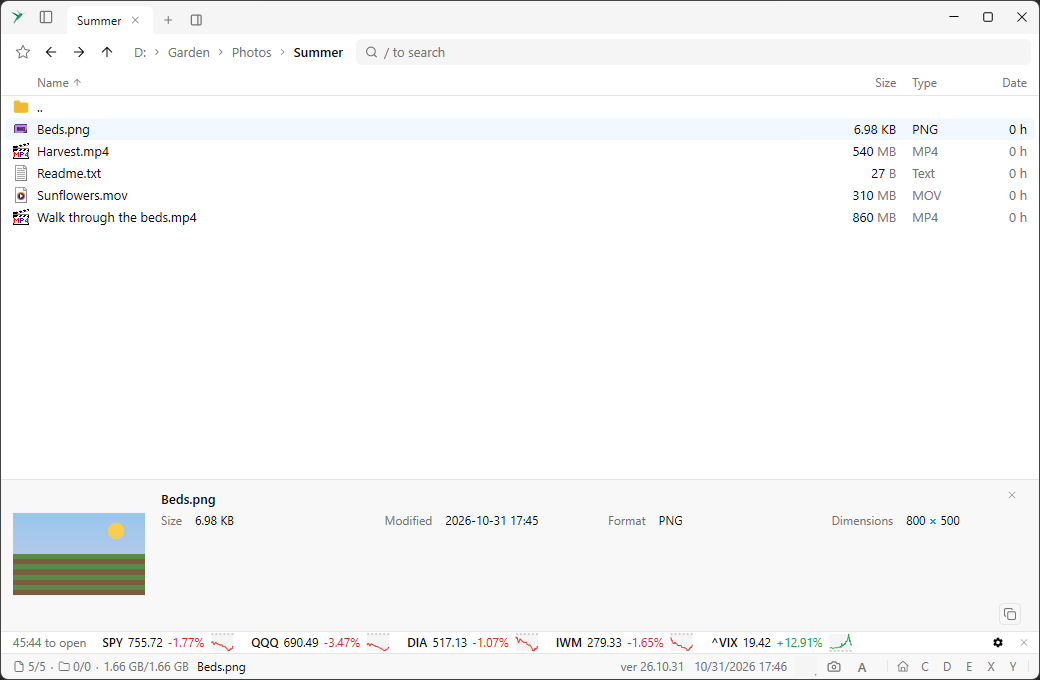
In a file list it shows:
- For a picture, a thumbnail with its format and dimensions.
- For a text or source file, its first lines.
- For an
.exeor.dll, details of the program. - For a
.lnkshortcut, what is in the shortcut. - For an object on S3, its metadata.
Other lists have their own details: Registry, Processes, Connections, Winget, and in Special places Clipboard History, Installed Programs, Startup Programs and Tailscale Devices. In those lists it starts open.
Drag the top edge to resize the panel. The x closes it. The copy button at the bottom right, or Copy info in the context menu, copies the text of the preview.